Conky configuration for Wayland
Conky configuration for Wayland
My current Conky config for a Wayland desktop, which looks like this:
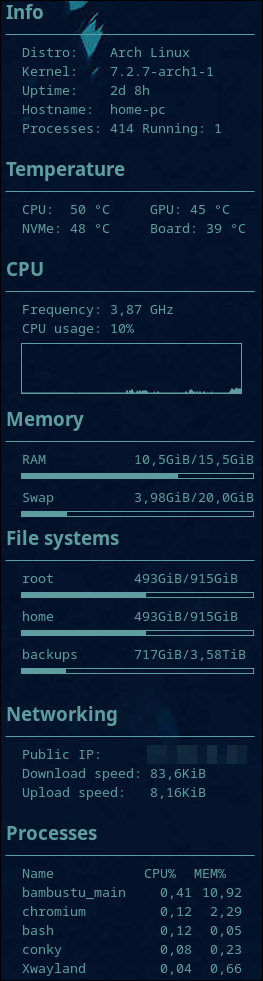
conky.config = {
    -- Placement
    alignment = 'middle_left',
    gap_x = 8,
    gap_y = 0,
    minimum_width = 200,
    minimum_height = 900,
    maximum_width = 250,
    border_inner_margin = 10,

    -- Window (Wayland / wlr-layer-shell)
    own_window = true,
    own_window_type = 'desktop',
    own_window_class = 'Conky',
    own_window_colour = '#00000000',
    out_to_wayland = true,
    out_to_x = false,
    out_to_console = false,
    out_to_ncurses = false,
    out_to_stderr = false,
    background = false,

    -- Fonts / text
    use_xft = true,
    font = 'Noto Sans Mono:size=10',
    default_color = '#5F9EA0',
    default_shade_color = '#000000',
    default_outline_color = '#000000',
    uppercase = false,
    extra_newline = false,
    use_spacer = 'none',
    top_name_width = 16,

    -- Drawing
    draw_borders = false,
    draw_outline = false,
    draw_shades = false,
    draw_graph_borders = true,
    show_graph_scale = false,
    show_graph_range = false,

    -- Sampling
    update_interval = 2.0,
    cpu_avg_samples = 2,
    net_avg_samples = 2,
    no_buffers = true,
}

conky.text = [[
${font Noto Sans:bold:size=14}Info${font}
$hr
  Distro:    Arch Linux
  Kernel:    $kernel
  Uptime:    $uptime_short
  Hostname:  $nodename
  Processes: $processes Running: $running_processes

${font Noto Sans:bold:size=14}Temperature${font}
$hr
  CPU:  ${hwmon k10temp temp 1} °C     GPU: ${execi 10 nvidia-smi --query-gpu=temperature.gpu --format=csv,noheader,nounits} °C
  NVMe: ${hwmon nvme temp 1} °C     Board: ${hwmon gigabyte_wmi temp 1} °C

${font Noto Sans:bold:size=14}CPU${font}
$hr
  Frequency: ${freq_g 1} GHz
  CPU usage: ${cpu cpu0}%
  ${cpugraph cpu0 50,220 -t}
${font Noto Sans:bold:size=14}Memory${font}
$hr
  RAM           ${mem}/${memmax}
  ${membar 5}
  Swap          ${swap}/${swapmax}
  ${swapbar 5}
${font Noto Sans:bold:size=14}File systems${font}
$hr
  root          ${fs_used /}/${fs_size /}
  ${fs_bar 5 /}
  home          ${fs_used /home}/${fs_size /home}
  ${fs_bar 5 /home}
  backups       ${fs_used /backups}/${fs_size /backups}
  ${fs_bar 5 /backups}

${font Noto Sans:bold:size=14}Networking${font}
$hr
  Public IP:      ${curl https://ifconfig.me/ip 60}
  Download speed: ${downspeed enp9s0}
  Upload speed:   ${upspeed enp9s0}

${font Noto Sans:bold:size=14}Processes${font}
$hr
  Name${goto 150}CPU%${goto 200}MEM%
  ${top name 1}${goto 150}${top cpu 1}${goto 200}${top mem 1}
  ${top name 2}${goto 150}${top cpu 2}${goto 200}${top mem 2}
  ${top name 3}${goto 150}${top cpu 3}${goto 200}${top mem 3}
  ${top name 4}${goto 150}${top cpu 4}${goto 200}${top mem 4}
  ${top name 5}${goto 150}${top cpu 5}${goto 200}${top mem 5}
]]
Notes:
- Save it as
~/.config/conky/conky.conf. - Conky must be built with Wayland support, and the compositor must support wlr-layer-shell.
- The
hwmonsensor names, the network interface (enp9s0) and the mount points are specific to my machine. Check yours withsensors,ip linkanddf. - The GPU temperature needs
nvidia-smi(NVIDIA driver).
2015 version (legacy syntax)
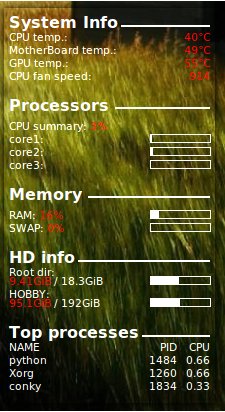
My old config, written in the pre-1.10 Conky syntax for X11. Kept for reference.
Old screenshot and config
# Use Xft?
use_xft yes
xftfont OFL Sorts Mill Goudy:size=8
xftalpha 0.8
text_buffer_size 2048
# Update interval in seconds
update_interval 1
# This is the number of times Conky will update before quitting.
# Set to zero to run forever.
total_run_times 0
max_specials 1024
max_user_text 18384
# Create own window instead of using desktop (required in nautilus)
own_window yes
own_window_transparent yes
#own_window_type override
own_window_class conky
own_window_hints undecorated,below,sticky,skip_taskbar,skip_pager
background no
# Use double buffering (reduces flicker, may not work for everyone)
double_buffer yes
# Minimum size of text area
minimum_size 200 0
#maximum_width 250
# Draw shades?
draw_shades no
# Draw outlines?
draw_outline no
# Draw borders around text
draw_borders no
# Stippled borders?
stippled_borders 0
# border margins
#border_inner_margin 5
#border_width 1
# Default colors and also border colors
default_color white
default_shade_color white
default_outline_color white
own_window_colour white
color1 white
# Text alignment, other possible values are commented
alignment bottom_left
# Gap between borders of screen and text
# same thing as passing -x at command line
gap_x 10
gap_y 20
# Subtract file system buffers from used memory?
no_buffers yes
# set to yes if you want all text to be in uppercase
uppercase no
# number of cpu samples to average
# set to 1 to disable averaging
cpu_avg_samples 2
# number of net samples to average
# set to 1 to disable averaging
net_avg_samples 2
# Force UTF8? note that UTF8 support required XFT
override_utf8_locale yes
# Add spaces to keep things from moving about? This only affects certain objects.
use_spacer none
TEXT
${font Goudy Bookletter 1911:style=Bold}System Info${font} ${hr 2}
${font}CPU temp.: ${alignr}${color #FF0000}${hwmon 1 temp 1}°C${color0}
${font}MotherBoard temp.: ${alignr}${color #FF0000}${hwmon 1 temp 2}°C${color0}
${font}GPU temp.: ${alignr}${color #FF0000}${execpi 10 nvidia-settings -q GPUCoreTemp|grep :0|cut -d ')' -f2|cut -d : -f2|tr -d .}°C${color0}
${font}CPU fan speed: ${alignr}${color #FF0000}${hwmon 1 fan 1}${color0}
#${font}Video fan speed: ${alignr}${color #FF0000}${hwmon 1 fan 2}${color0}
#${font}Power fan speed: ${alignr}${color #FF0000}${hwmon 1 fan 3}${color0}

${font Goudy Bookletter 1911:style=Bold}Processors ${hr 2}
${font}CPU summary: ${color #FF0000}${cpu}% ${color0}
${font}core1: ${alignr}${cpubar cpu1 8,60}
${font}core2: ${alignr}${cpubar cpu2 8,60}
${font}core3: ${alignr}${cpubar cpu3 8,60}

${font Goudy Bookletter 1911:style=Bold}Memory ${hr 2}
${font}RAM: ${color #FF0000}$memperc%${color0} ${alignr}${membar 8,60}
${font}SWAP: ${color #FF0000}$swapperc%${color0} ${alignr}${swapbar 8,60}
#${font StyleBats:size=16}q${font} Uptime: ${alignr}${uptime}

${font Goudy Bookletter 1911:style=Bold}HD info${font} ${hr 2}
${font}Root dir:
${voffset -4}${color #FF0000}${fs_free /}${color0} / ${fs_size /} ${alignr}${fs_bar 8,60 /}
${font}HOBBY:
${voffset -4}${color #FF0000}${fs_free /media/D}${color0} / ${fs_size /media/D} ${alignr}${fs_bar 8,60 /media/D}

#${font Goudy Bookletter 1911:style=Bold}NETZWERK${font} ${hr 2}
#${voffset 4}${font PizzaDude Bullets:size=14}O${font} Up: ${upspeed eth0} ${alignr}${upspeedgraph eth0 8,60 000000 000000}
#${voffset 4}${font PizzaDude Bullets:size=14}U${font} Down: ${downspeed eth0} ${alignr}${downspeedgraph eth0 8,60 000000 000000}
#${voffset 4}${font PizzaDude Bullets:size=14}N${font} Upload: ${alignr}${totalup eth0}
#${voffset 4}${font PizzaDude Bullets:size=14}T${font} Download: ${alignr}${totaldown eth0}
#${voffset 4}${font PizzaDude Bullets:size=14}a${font} Local Ip: ${alignr}${addr eth0}
#${voffset 4}${font PizzaDude Bullets:size=14}a${font} Public Ip: ${alignr}${execi 1800 ext-ip.sh}
${font Goudy Bookletter 1911:style=Bold}Top processes${font} ${hr 2}
NAME $alignr PID CPU
${top name 1} $alignr ${top pid 1} ${top cpu 1}
${top name 2} $alignr ${top pid 2} ${top cpu 2}
${top name 3} $alignr ${top pid 3} ${top cpu 3}
#${top name 4} $alignr ${top pid 4} ${top cpu 4}
#${top name 5} $alignr ${top pid 5} ${top cpu 5}
#
#${font Goudy Bookletter 1911:style=Bold}WETTER${font} ${hr 2}
#Station: ${execi 3600 conkyForecast --location=GMXX0018 --datatype=CN}
#Wetterlage: ${execi 3600 conkyForecast --location=GMXX0018 --datatype=CC}
#${font ConkyWeather:size=34}${execi 3600 conkyForecast --location=GMXX0018 --datatype=WF}${font}
#Temp: ${execi 3600 conkyForecast --location=GMXX0018 --datatype=HT}
#Vorausschau:
#${voffset 4}${font ConkyWeather:size=34}${execi 3600 conkyForecast --startday=1 --endday=3 --location=GMXX0018 --spaces=2 --datatype=WF}${font}
#${voffset 4}${execi 3600 conkyForecast --location=GMXX0018 --startday=1 --endday=3 --spaces=16 --datatype=HT}
#${voffset 4}${execi 3600 conkyForecast --location=GMXX0018 --startday=1 --endday=3 --spaces=5 --datatype=DW}
Last updated on